
Keeping tabs on your social media connections these days is like bar hopping, without the cocktails or pool tables with stained felt.
You run over to check your Twitter account. Then you dash to Facebook to see what’s going on there. Then Linkedin. Maybe your blog. All the while you’re feeling like you’re playing catch-up, that something awesome may have happened, and you missed it because you weren’t online. Sound familiar?
Sure, you can centralize some of your social media chores (great post by Chris Brogan), by using Tweetdeck or Seesmic. But that only helps if you’re online and “in the flow.”
For normal humans that check social media a couple times a day, NutshellMail may become your new favorite social companion. And it’s free.
Like RSS for your relationships
NutshellMail sends you a highly customizable email digest (from 1 to 24 times per day) of what’s happening in your social media spheres, so you can browse and get up to speed quickly, without having to visit several different destinations or fire up your iPhone’s social apps.
Twitter Without the Hassle
Want to know who has signed up to follow you on Twitter today? Who unfollowed you today? All the DMs and @ replies you received in the last three hours? NutshellMail batches it all up and sends it to you in a tidy email at the exact time of your choosing. You can even include Twitter searches in your feed, enabling you to use NutshellMail the same way you’d use TweetBeep, or an RSS feed of Twitter search results.
Handy Facebook Reminders
It’s pretty tough to find a credible excuse for missing people’s birthdays on Facebook. NutshellMail saves you from being labeled an ingrate by reminding you of all the birthdays of your Facebook friends this week. The email also can be configured to show you all new friend requests, status updates from pages that you’re a fan of, as well as photos, videos and links from your friends. Plus, event invites, and photos in which you’re tagged.
And More…
Although I’m not using it presently, you can also configure your NutshellMail to include Linkedin and MySpace content, as well as updates from the Ning groups of which you are a member.
Also, if you have several different email accounts, you can use NutshellMail to automatically combine the emails sent to your secondary and tertiary accounts and forward them together to your primary account.
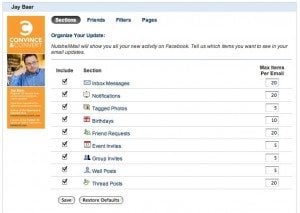
All the content shown in each email is clickable. So, if you want to see more about a new Twitter follower, you can simply click the name or photo in the email, and instantly visit their bio. You can also manage your customization preferences by clicking links in the email, so visiting the NutshellMail Web site isn’t needed after initial sign-up.
Social Integration in an Instant
One of the outstanding new add-on features of NutshellMail is their Facebook app, which enables Facebook fan page managers to easily add an email newsletter tab to the page. Subscribers then receive a digest of all the content posted to the fan page. I’ve been talking a lot about the integration of email and social media, and this is another example of using cross-functional technology to build content creation and deployment synergies. Note that NutshellMail is funded in part by FBFund, Facebook’s venture capital arm.
Here’s a nice video demonstration of NutshellMail and how it can save you time and social media aggravation.
I’ve been using NutshellMail for a few weeks now, and find it indispensible. (Thanks to my friend Will Smith – the world’s second most popular Will Smith – for turning me on to it).
How can you make use of NutshellMail to simplify your social media chores?




Turn the Tables on Social Media with NutshellMail http://bit.ly/arrYBC
Turn the Tables on Social Media with NutshellMail http://bit.ly/cpCNjJ
Jay Baer Blog: Turn the Tables on Social Media with NutshellMail http://bit.ly/95IZcP Full http://bit.ly/cwSQTq
Turn the Tables on Social Media with NutshellMail http://bit.ly/aX0fES Social-Media.alltop
Turn the Tables on Social Media with NutshellMail http://bit.ly/bn7vIk #news #socialmedia
Turn the Tables on Social Media with NutshellMail – http://bit.ly/cclmCf
Turn the Tables on Social Media with NutshellMail http://bit.ly/9ESz6W
Turn the Tables on Social Media with NutshellMail http://bit.ly/9tZA3q #news #socialmedia
rt @jaybaer trying nutshell mail http://ow.ly/1919Q
Reading: Turn the Tables on Social Media with NutshellMail: Keeping tabs on your social media connections these da… http://bit.ly/c6pxgh
You had me at “-Mail.” This, I'll try.
Having trouble keeping tabs on all the social-ness you're into? NutshellMail does the heavy lifting for you for free — http://bit.ly/ciTXCW
Turn the Tables on Social Media with NutshellMail http://bit.ly/cJQvOS
WAY cool way to keep up w/ all your social media accounts in one convenient spot: your inbox. http://ow.ly/193Z0
RT @SMOSEOSEM: WAY cool way to keep up w/ all your social media accounts in one convenient spot: your inbox. http://ow.ly/193Z0 http:/…
RT @SteveGaines62: WAY cool way to keep up w/ all your social media accounts in one convenient spot: your inbox. http://ow.ly/193Z0
New post: Randy Kemp: Turn the Tables on Social Media with NutshellMail http://bit.ly/cJQvOS (http://cli.gs/tTnbP)
RT @jaybaer: Turn the Tables on Social Media with NutshellMail: Keeping tabs on your social media connec… http://bit.ly/bu1VG5 #marketing
interesting. RT @jaybaer: Turn the Tables on Social Media with NutshellMail http://bit.ly/dA4Jvm (this tool is a big time-saver)
RT @jaybaer Turn the Tables on Social Media with NutshellMail http://bit.ly/dA4Jvm (this tool is a big time-saver)
I too set up NutShellMail and even added a tab for it on one of our Facebook fan pages. However, I found the default content excessive and the reaction of fans not favorable. Personally, I did not find it helpful, although the concept holds promise.
Turn the Tables on Social Media with NutshellMail – http://bit.ly/cz1d0K
Thanks, I'm going to check it out.
Turn the Tables on Social Media with NutshellMail: http://goo.gl/5bCt
RT @AymanRakha – Turn the Tables on Social Media with NutshellMail: http://goo.gl/5bCt
This sounds very useful. I'm going to try it!
Another #SXSW Accelerator company, this time covered by @jaybaer http://bit.ly/dA4Jvm –> @NutshellMail
New Email Service NutshellMail Simplifies Social Media http://ow.ly/199Dn Would you use this service?
RT @jaybaer: Social integration in an instant with NutshellMail (saves me a ton of time) http://bit.ly/dA4Jvm
Checking it out now… RT @jaybaer: Social integration in an instant with #NutshellMail (saves me a ton of time) http://bit.ly/dA4Jvm
FYI, Jay, I shared your post on my blog yet again. I'm also now using NutshellMail because of your blog! Continue to post awesome-ness.
Great suggestion Jay – RT @jaybaer: Social integration in an instant with NutshellMail (saves me a ton of time) http://bit.ly/dA4Jvm
Great for those who aren't constantly "on" RT @jaybaer SM updates in an instant w/NutshellMail (saves me a ton of time) http://bit.ly/dA4Jvm
Great post and helpful tool – thanks @jaybaer – Turn the Tables on Social Media with NutshellMail http://bit.ly/afRtRL
RT @jaybaer: Social integration in an instant with NutshellMail (saves me a ton of time) http://bit.ly/dA4Jvm
Turn the Tables on Social Media with NutshellMail http://bit.ly/afRtRL
Turn the Tables on Social Media with NutshellMail: http://bit.ly/bfkUOF (@jaybaer) Keeping tabs on your social media connections
Looks cool, thanks! RT @jaybaer: Social integration in an instant with NutshellMail (saves me a ton of time) http://bit.ly/dA4Jvm
Just got my first cumulative social media email from Nutshell. Big help. Thanks for sharing this Jason.
New post: Patrick @ Pure Driven: Turn the Tables on Social Media with NutshellMail http://bit.ly/afRtRL (http://cli.gs/zZT9v)
@jaybaer Thanks for the great review of #NutshellMail! Turn the Tables on Social Media with NutshellMail http://bit.ly/ds55sj
Turn the Tables on Social Media with NutshellMail http://bit.ly/afRtRL
RT @mschmulen: Turn the Tables on Social Media with NutshellMail http://bit.ly/afRtRL
Jay – As Brittany would say (minus the oops)…you did it again. I just set up my account and am digging in. Hey – is there better way to spend a Friday evening when my wife is out of town? Beer and NutshellMail.
I currently set up the email alerts to be sent every 4 hours – 6AM, 10AM, 2PM & 6PM. Ill see if this cadence works. Also, toying with the amount and type of content I want to be alerted about. I'm taking some of your suggestions above and tailoring to what I *think* will work best for my personal needs. As I am starting to preach more and more in email marketing – there is no such thing as best practices, only practices that are best for YOU.
Thanks for not only making people aware of this with your post, but also doing some of the leg work.
Rock on.
DJ Waldow
Director of Community, Blue Sky Factory
@djwaldow
Turn the Tables on Social Media with NutshellMail http://bit.ly/cJQvOS
Testing this out & will let you know if useful > RT @NotEasyToForget: Turn the Tables on Social Media with NutshellMail http://bit.ly/cJQvOS
Thanks to another strong @jaybaer post – http://idek.net/14ez – I'm setting up my @nutshellmail account now. Gracias, Jay!
RT @jaybaer: Social integration in an instant with NutshellMail (saves me a ton of time) http://bit.ly/dA4Jvm
RT @djwaldow: Thanks to another strong @jaybaer post – http://idek.net/14ez – I'm setting up my @nutshellmail account now. Gracias, Jay!