
Knowing which of your blog posts are most successful, and in what way, is invaluable in the never-ending process of honing your blog’s content approach and community 
orientation. Bloggers have always been challenged by on one hand having both a surplus of potential success metrics, and a scarcity of data aggregation tools.
The new PostRank Analytics (in public beta) changes that, and is a most welcome development in blog tracking and measurement.
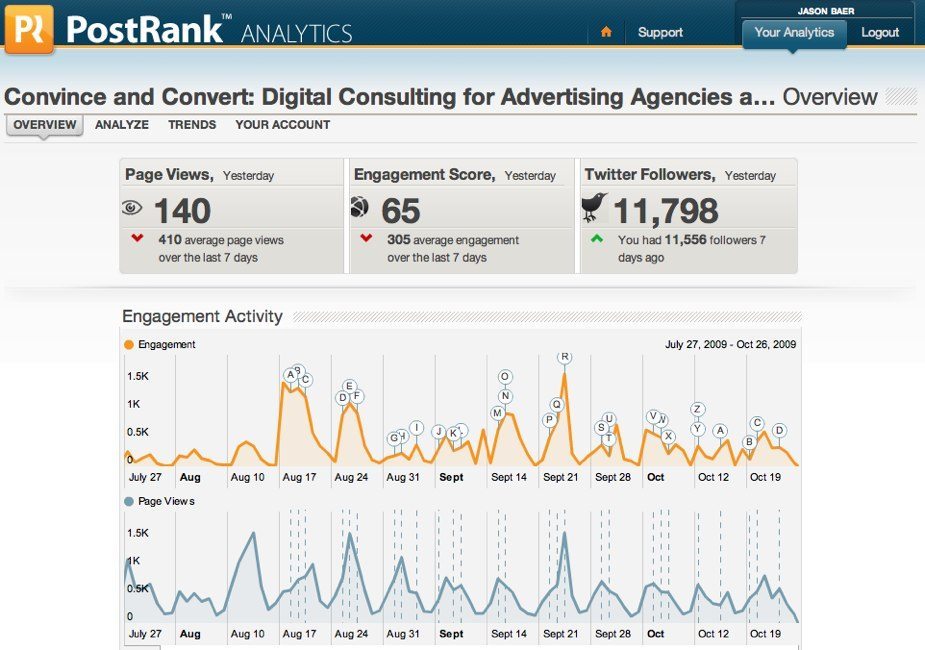
Just $9/month with a 30-day free trial, PostRank Analytics provides comprehensive success metrics for every one of your blog posts, including page views, average time spent reading, number of comments, tweets, and mentions in social bookmarking sites like Digg and Stumble Upon. All of this data is presented in one, easy-to-understand layout that allows you to quickly compare your posts to see patterns of success.
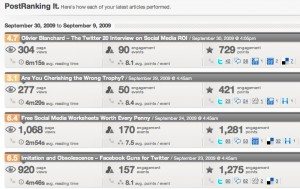
PostRank Analytics also includes an aggregated “engagement score”, numerical shorthand for how each post fared. The engagement score is created using an algorithm that takes into account the other metrics such as comments, tweets, etc. It’s not dissimilar from Facebook’s engagement score mechanism on fan pages.
5 Minute Hook Up with Google Analytics
To utilize PostRank Analytics on your blog, just create and account and configure your Google Analytics account to sync with PostRank Analytics. This requires you logging in to your Google account and enabling this connection, a 5-minute procedure with no technical skills required. You do, however, have to have a Google Analytics account for PostRank Analytics to provide sufficient value.
One of the other useful features of PostRank Analytics is that you can get your daily metrics, including your engagement score, emailed to you in a tidy, easy-to-understand format. Perfect for distributing to all of your team members in a group blogging situation.
Additionally, PostRank Analytics lets you see who is engaging with each of your posts, providing a tidy list of tweets, diggs, comments, etc. all in one place. You can also see trend data that charts how frequently people engage with your content over time in each social outpost.

There are still some kinks to work out (on occasion, links do not work, etc.) and the methodology and context behind “engagement points” calculation is still a bit mysterious (PostRank claims they are working on a more detailed explanation), but for serious bloggers, I recommend you give PostRank Analytics a try. It’s an elegant way to chart your progress and refine your content. The daily email reports alone are worth the two lattes per month fee.
Have you tried Postrank Analytics?




Twitter Comment
#SMM Finally! A Blog Post Scoreboard [link to post]
– Posted using Chat Catcher
Twitter Comment
Finally A Blog Post Scoreboard | Social Media Marketing | Social …: Social Media Strategy Blog Social Media C.. [link to post]
– Posted using Chat Catcher
Twitter Comment
“Finally A Blog Post Scoreboard” Jay Baer and Jason Falls weigh in. [link to post] http://j.mp/2Uzuu4
– Posted using Chat Catcher
Nice find Jay. Thanks for sharing. This looks like a great way to extend Google Analytics. Launching a new blog shortly. Will incorporate from the get go and see how she fares.
.-= Jim Alexander´s last blog ..@MicheleNorthrup – a conversation =-.
Twitter Comment
Finally A Blog Post Scoreboard | Social Media Marketing | Social …: … Analytics provides comprehensive succ.. [link to post]
– Posted using Chat Catcher
Twitter Comment
Finally A Blog Post Scoreboard | Social Media Marketing | Social … [link to post]
– Posted using Chat Catcher
Twitter Comment
RT @jaybaer Finally A Blog Post Scoreboard | Social Media Marketing | Social Media Consulting – Convince & Convert [link to post]
– Posted using Chat Catcher
Jason. What a great tool. Thank you!
Twitter Comment
RT @jaybaer: What new metrics from Postrank can teach you about the secrets to your blog’s success. [link to post]
– Posted using Chat Catcher
Hi Jay – Wow, awesome overview. Thank you! (I always love it when other folks help me educate and evangelize.)
First thing, we do have a first cut of a better engagement explanation out there now: https://analytics.postrank.com/docs/engagement — it will soon be updated in much prettier format. Feedback on any additional clarity people are looking for is welcome (melanie@postrank.com).
For folks who have any problems signing up or see things that don’t work for them (like links, as you mentioned above), do let me know ASAP — that’s the fastest way to get stuff fixed. Same email address applies, or tweet me if it’s a short one: @postrank.
Some of the things we’re currently working on are multi-blog/multi-blogger support, additional Trends info, and fixing a couple of quirks with the payment system integration. (Many thanks to our early adopters who’ve been patient.)
We’re always jazzed when people express that they’ve found real value in the service. It is a 1.0 product, so we’re always looking to hear from you to know what YOU need to make it more useful. (Plus, hearing from people like yourself who’re active bloggers and using the system gives Analytics the best kind of credibility.)
Oh, and one other tidbit – every account sign-up gets assigned a referral code, which you can access in the Your Account section. If others sign up using that referral code, you get a free month of Analytics for each sign-up.
Thanks again.
Twitter Comment
Article: “Finally! A Blog Post Scoreboard” [link to post]
– Posted using Chat Catcher
Twitter Comment
Finally A Blog Post Scoreboard | Social Media Marketing | Social … [link to post]
– Posted using Chat Catcher
RT @jaybaer Finally A Blog Post Scoreboard | Social Media Marketing | Social Media Consulting – Convince & Convert http://bit.ly/3awYhL
RT @jaybaer: Finally! A blog post scoreboard. Postrank adds detailed analytics, helps bloggers chart success over time. http://ow.ly/wZtI
RT @jaybaer Finally A Blog Post Scoreboard – http://bit.ly/3awYhL
RT @jaybaer Finally A Blog Post Scoreboard | Social Media Marketing | Social Media Consulting – Convince & Convert http://retwt.me/1B3Yb
Ah!!! at last I found what I was looking for. Somtimes it takes so much effort to find even tiny useful piece of information.
Nice post. Thanks
Twitter Comment
RT @tweetmeme Finally A Blog Post Scoreboard | Social Media Marketing | Social Media Consulting – Convince & Convert [link to post]
– Posted using Chat Catcher
RT @tweetmeme Finally A Blog Post Scoreboard | Social Media Marketing | Social Media Consulting – Convince & Convert http://retwt.me/1B3Yb
I've signed up to the 30 day trial, look forward to using this, many thanks.
Hi,
Thank you! I always love it when other folks help me educate and evangelize
Yes, it is right that if we post something different stroy then we get more readers