

Over the past 12 years, our team at Convince & Convert has created, hosted and promoted hundreds (maybe even thousands) of webinars and virtual conferences. Done right, they are an incredible way to generate leads and connect with your audience.
In fact, a Content Marketing Institute study found that 58 percent of B2B marketers implement webinars in their content marketing strategy. This is no surprise, since webinars can be very engaging, and they’re not very expensive to create or distribute.
In my 12+ years of experience in B2B marketing and sales, no other type of content has been able to move the needle in the sales process as much a webinar can.
Since webinars are so important for B2B marketers today (and even some B2C marketers), we’ve put together the following tips to help you create a webinar from scratch.
1. Choose Your Team
A webinar usually has three prime players. The success of your session depends on them, and I recommend that you carefully consider your options when selecting the following:
- The Organizer: The organizer or the facilitator is the key individual responsible for developing content for the webinar. They are also responsible for finding a suitable speaker and promoting the event. They are in charge of registrations and communicating with the participants at the beginning and end of the webinar.
- The Presenter(s): The Presenters or the Subject Matter Experts should focus on developing and delivering the webinar presentation. They look after webinar programming and troubleshooting, event registration, and other details to help them deliver an engaging presentation.
- Assistant(s): Assistants help in answering queries that the Presenter and the Facilitator don’t have much time for. They help by responding to technical queries. (For example, “The audio and video are not in sync!” or “There is no sound!”) Assistant(s) are often required for webinars with a large audience.
2. Decide On the Webinar Format
The next step is to decide on the format of your webinar. I suggest you choose a format that will best relay your message while engaging your audience. You can consider the following four webinar formats:
- Single Speaker: As the name suggests, this involves a single speaker communicating with the attendees. The speaker will also demonstrate the contents of the webinar and answer all queries raised by the attendees. I recommend this type of webinar if you have a small audience.
- Interview Format: This involves a speaker acting as an interviewer and asking a set of predetermined questions to the Subject Matter Expert(s). This type of webinar can be very engaging, with the attendees watching the SMEs answer questions. It also encourages them to ask questions, making it interesting.
- Moderated Panel Discussion: Like a panel discussion, a panel webinar has several speakers who talk over a predetermined topic. A moderator will need to facilitate this type of webinar.
- Q&A: Similar to the interview format, this type of webinar also allows the speaker to answer questions, but this time, the questions directly come from the audience. I recommend that you collect the questions beforehand. This will ensure that you stay on schedule and vet the questions coming from the audience. Q&A segments are usually added at the end of all webinar formats.
3. Plan Visuals for Your Webinar and Get Your Presenters Camera-Ready
Being a web-based seminar, webinars largely rely on audio and visual materials to demonstrate their contents. Slides filled with text will not do the trick.
In fact, the best webinars should feel more similar to the face-to-face experience, you should require presenters to use their web cam while presenting.

This allows audience to see the speaker during the presentation, which adds another layer of information such as non-verbal cues, etc.
However, this requires each presenter to not only have a decent camera (ideally, better than their on-board laptop cam) as well as suitable lighting.
This isn’t necessarily a huge challenge, but is another wrinkle that presenters don’t have to contend with in a face-to-face event (and is another reason you need run-throughs).
In terms of slides, Including suggest you consider the following points when preparing visuals for your next webinar:
- Have an introductory slide with information like the time of commencement and points to be discussed in the webinar. But make it fun!
- After this, have a slide showcasing a synopsis of the topics that will be covered in the webinar.
- Include a slide of tools and websites that will be used in the process. I recommend that you use the tools and websites in real time during the webinar so that you can have a better impact on the audience.
4. Select a Webinar Solution
Here at Convince & Convert, we are big fans of Zoom. But we’ve used many solutions in the past, including GoToWebinar, BigMarker, Adobe Connect, WebEx, ClickMeeting and more. All have their pros and cons. There is no perfect solution (we are happy to help you navigate the pros and cons of each — just let us know).
You can also use your webinar solution to conduct polls and surveys after the session. This will help you gain valuable insights to further improve your webinars.
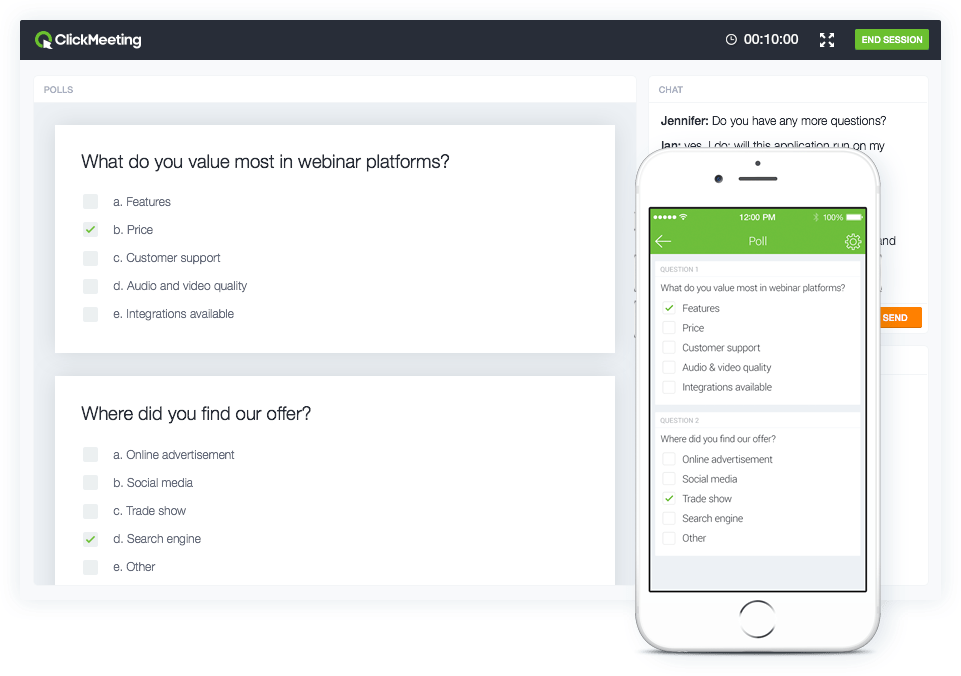
Here are a few questions you should ask yourself when selecting a webinar tool to invest in:
What are the objectives of your webinar?
Before selecting a webinar service, you should think about objectives of the webinar. If it’s a product launch or promotion of your business, chances are that you are targeting a larger audience. In this case, you need a webinar service that will help you interact with a large number of attendees.
How user-friendly is the product?
As webinars come with a time limitation, it is essential that you choose the right service tool so that you can make the most of it within the time frame allocated for the webinar. If you are planning a webinar in the single speaker format, you will be looking for simplest possible software so that you can successfully demonstrate your business content to the attendees.
How much does it cost?
With so many webinar service tools available in the market, it is easy to get confused while choosing the correct webinar service tool for your webinar. I find it best to consider the target audience when considering the cost. For example, if it’s a large audience you are targeting, you will need an enterprise package. With a medium or small scale audience, however, you can easily go ahead with a premium edition.
Answers to these three questions will determine how much you should spend on a service tool.
5. Set Up the Right Equipment and Space
You’ll need a quiet place to conduct your webinar. Consider a conference room or any other place which will be free from background noise and interruptions.
Selecting the right equipment is also crucial for your webinar. Consider landlines and headset microphones, as they are less likely to cut off while you engage with your audience.
Have a keep a backup laptop that’s fully charged, with all data copied and stored in it. This will ensure that everything goes smoothly even if you experience any technical difficulties with your primary computer system.
Choosing the right equipment and space will not only improve the webinar quality but also ensure a great experience for your audience. Here is our full list of recommended webinar tools and equipment.
6. Publicize and Promote Your Webinar
In order to make sure your webinar gets maximum participation, it’s crucial that you promote it as much as possible beforehand. Here’s how I suggest you promote it:
- Start by creating a landing page which introduces the webinar topic, the speaker(s), features the date and time, and a call-to-action for people to sign up to attend the event.
- Create a banner or display an advertisement on your website’s homepage to make visitors aware of the upcoming event.
- Use social media sites like Facebook and Twitter to spread the word. Create a dedicated and original hashtag to publicize the event. This hashtag will benefit you at the time of the event, as you will be using it to interact with the attendees.
- Send multiple reminders emails showcasing the countdown to your event. 45 percent of marketers say that emails are the most effective at driving registrations (in my experience, this is true).
- On the day of the event, make sure to send emails with the direct link to your webinar.
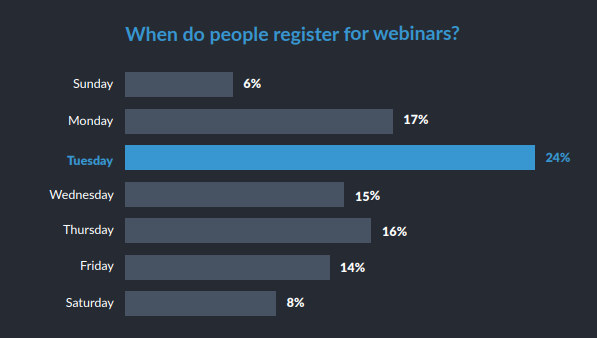
- Tuesdays are generally the best days for promoting your webinar, as revealed in a GoToWebinar report.
7. Pick the Right Date and Time
You should keep in mind that not all your audience members will be from the same location. The webinar should be hosted on a specific date and time that will allow the maximum number of attendees to be present. If your target audience is in New York, and you are located in Los Angeles, starting a webinar at 3:00 p.m. Pacific Time may not be a good choice, as it will be late for the attendees living in New York.
It is important that you select the right date and time for your webinar event. The best time to conduct your webinar depends on the target demographic, but a poll conducted by ON24 suggests that the best days to host your webinars are Tuesdays and Wednesdays.
You can use Google Analytics to locate the regions of the world where most of my online traffic comes from. You can also send surveys to your potential attendees asking them for the most convenient times for them to attend the webinar.
These are major factors that should not only be considered but prioritized. Significant research and planning should be done on them so that you can expect the most from your webinar and boost your business.
8. Choose a Topic of Interest
If your topic does not interest your potential audience, it is going to be really difficult for you to lure them into attending your webinar. Since webinars are usually an hour long, you can either choose to vaguely talk about many topics or speak about a single topic and dive deep into it.
That’s why I always recommend that you get very specific when selecting a topic for your webinar. For example, instead of simply talking about digital marketing in general, you could talk about digital marketing trends, or budgeting for digital marketing, etc.
While searching for an interesting topic, you should consider:
- Previously produced content: While searching for an interesting topic, consider going through the content that you have already produced. It can be a blog post, social media post, or an article. Search through those posts and articles to find the one that received the most attention. This will help you understand which topics your audience is interested in. Now you can dive deep into the specific topic you have selected so that you can provide in-depth understanding to the audience and, in the process, keep them engaged.
- Attending other webinars: Start attending various other webinars taking place in your field. This will not only help you in getting new ideas from your competitor’s topic but also help you understand trends in the kinds of topics being discussed. Through these insights, you can decide on a viable topic and perfect it through research.
Once you have selected your topic, you need to ask yourself the following questions:
- Is there a particular question your clients and potential audience frequently ask that you could address in a webinar?
- What are your strengths, and what would be really entertaining for you to teach?
- What would be the most valuable thing you can offer within 40 or 60 minutes?
If you find the most suitable answers to these questions then, congratulations! You have just found your topic for your upcoming webinar. If it’s the other way around, keep searching until you find a better one.
9. Keep Practicing
I always make sure to practice for a webinar several days before I go live to ensure everything goes smoothly.
Start doing dry runs which will help everyone involved with the webinar get a picture of its entirety. Check all equipment to ensure they are working properly. A final dry run two to three days before the live webinar will ensure the following:
- Confirm if everyone is well-versed with the webinar software technology and the contents of the webinar.
- Finalize presentation slides to prevent last-minute changes.
- Choose the communication methods that suits best with the team.
- Assign individuals activities that need to be monitored during the webinar such as polls, Q&As, group chats, etc.
- Reviewing the final registration based on details such as names of attendees, their respective industries, etc. The host should be fully aware of such information.
10. Follow Up with the Attendees
I’ve noticed that some marketers fail to follow up with attendees at their webinar. This can be a grave mistake, as you’re missing out on an opportunity to continue engaging your audience.
Send them an email thanking them along with a survey asking them to share their feedback and rate their experience, plus a call to action for future webinars. Make sure to send a follow-up email along with a recording of the webinar to the people who signed up for the webinar but were unable to attend it. Following up will go a long way in encouraging the audience to attend future webinar events and even be involved with your company.
Once you have successfully hosted your webinar, start evaluating your efforts.Use the feedback provided by your attendees in the follow-up emails. Consider these and make adjustments to ensure that your future webinars are even more successful.
Great webinars are well planned, organized and executed by a closely knit team. You should spend sufficient time to plan and test the program to remove any flaws.
This post was originally written by Shane Barker in 2018 and updated by Megan Leap in 2020.